
Capture attendance from biometrics, geo-fencing, or mobile — and watch it flow directly into payroll. LeiPay's attendance management software works as complete employee time tracking software — tracking punch-ins, shifts, overtime, leave, and LOP automatically — no manual data entry, no payroll errors.
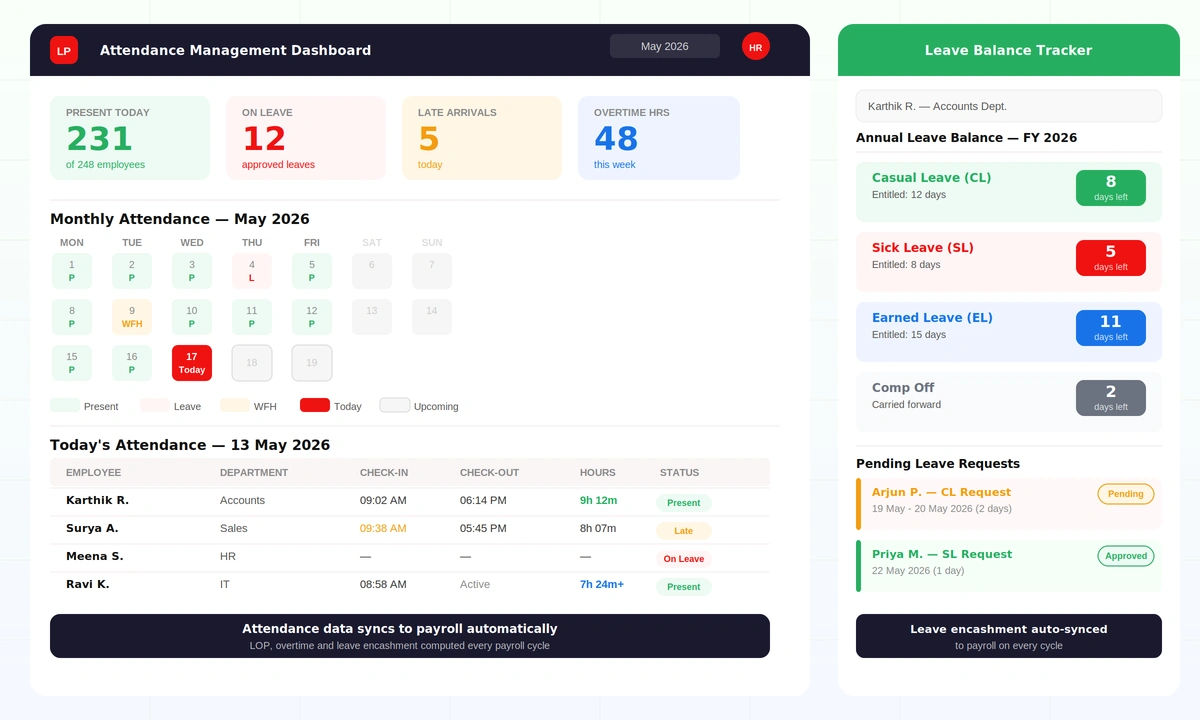
Inaccurate attendance is the leading cause of payroll errors. When HR teams manually transfer attendance data, errors creep in — wrong LOP counts, missed overtime, incorrect leave encashment. LeiPay eliminates this entirely.
Our attendance management software doubles as biometric attendance software — capturing data from biometric devices, geo-fencing, or mobile check-ins — then automatically feeds it into payroll calculations. Shifts, overtime, permissions, late arrivals, half-days, and leave balances are all tracked and calculated without any manual step.
Capture attendance through biometric devices, geo-fence check-in, mobile app, or manual entry — all feeding into a single attendance register. Built-in shift management software supports shift-based tracking, flexi-hours, WFH marking, and branch-wise attendance policies for multi-location businesses.
Configure leave types (CL, SL, EL, comp off, maternity) with custom entitlements, carry-forward rules, and encashment policies. Employees apply online, managers approve through a workflow — and leave balances update instantly across the system.
Every attendance record — present days, half-days, LOP, overtime, and leave encashment — feeds directly into the payroll engine. Salary calculations are always based on verified attendance data, not estimates or manual entries.
For businesses where employees work across multiple projects — consulting, construction, IT services, field operations — standard monthly salary doesn't reflect actual project effort. LeiPay's project-based timesheet payroll solves this.
Employees log hours worked on each project through the timesheet module. LeiPay calculates salary automatically based on the configured project rate and the recorded hours — no manual calculation, no spreadsheet reconciliation. Every project, every employee, every hour accounted for.
Employees log hours worked on each project daily or weekly. Manager approval workflow before hours are locked for payroll.
Set hourly, daily, or project-based rates per employee or per project. Different rates for different project types or client contracts.
Hours × rate = salary component. LeiPay computes and adds the project-based earnings to the employee payslip automatically every payroll cycle.
See total labour cost per project, per employee, and per period. Useful for client billing, project profitability analysis, and budget tracking.
See how LeiPay connects attendance capture, leave management, and payroll in a single live demo.
Set up shift timings, grace periods, overtime rules, holiday calendars, and branch-wise policies in LeiPay. Different departments can have different attendance rules — all managed centrally.
Attendance is captured via biometric device, geo-fence, mobile app, or supervisor entry. Every punch-in and punch-out is timestamped and recorded — with the capture method logged for audit purposes.
LeiPay automatically calculates working hours, late arrivals, early departures, overtime, and half-days for every employee based on the configured shift policy — no manual calculation required.
Employees apply for leave through the self-service portal. Managers receive requests in their workflow queue, approve or reject with remarks, and leave balances update immediately across the system.
At payroll processing time, all attendance data syncs automatically — present days, LOP days, overtime hours, and leave encashment. No manual data transfer, no spreadsheet reconciliation.
Generate attendance summaries, late-coming reports, leave utilisation reports, and LOP statements instantly. All reports are audit-ready and exportable for management reviews or statutory compliance.
Attendance data flows directly into salary calculations — no manual re-entry, no copy-paste errors, no missed LOP days. Payroll is always based on verified data.
Works with biometric devices, geo-fencing, and mobile — or all three together. Each branch can use its own capture method while HR sees everything in one unified dashboard.
Know instantly who is present, who is late, who is on leave, and who is on overtime — without calling anyone or checking spreadsheets.
Leave requests, approvals, balance deductions, and encashment — all handled through a configurable workflow. HR spends zero time on leave administration.
Each branch can have its own shift timings, holiday list, and attendance policy — managed from one central platform with full visibility across all locations.
Attendance capture modes — biometric, geo-fence, mobile
Manual data transfers from attendance to payroll
Payroll accuracy from verified attendance data
Leave types supported with custom encashment rules
See LeiPay's attendance management in action — biometric to payroll, leave to encashment, all in one platform.