
Define exactly who in your organisation can see, edit, or process what. LeiPay's role-based access control ensures sensitive payroll data is visible only to authorised users — with every access attempt logged, every unauthorised action blocked.
Salary information is among the most sensitive data in any organisation. When access is not controlled, it creates compliance risk, employee trust issues, and security vulnerabilities — a branch manager who can see the CEO's salary, an employee who accidentally views a colleague's payslip, a vendor with access to HR records.
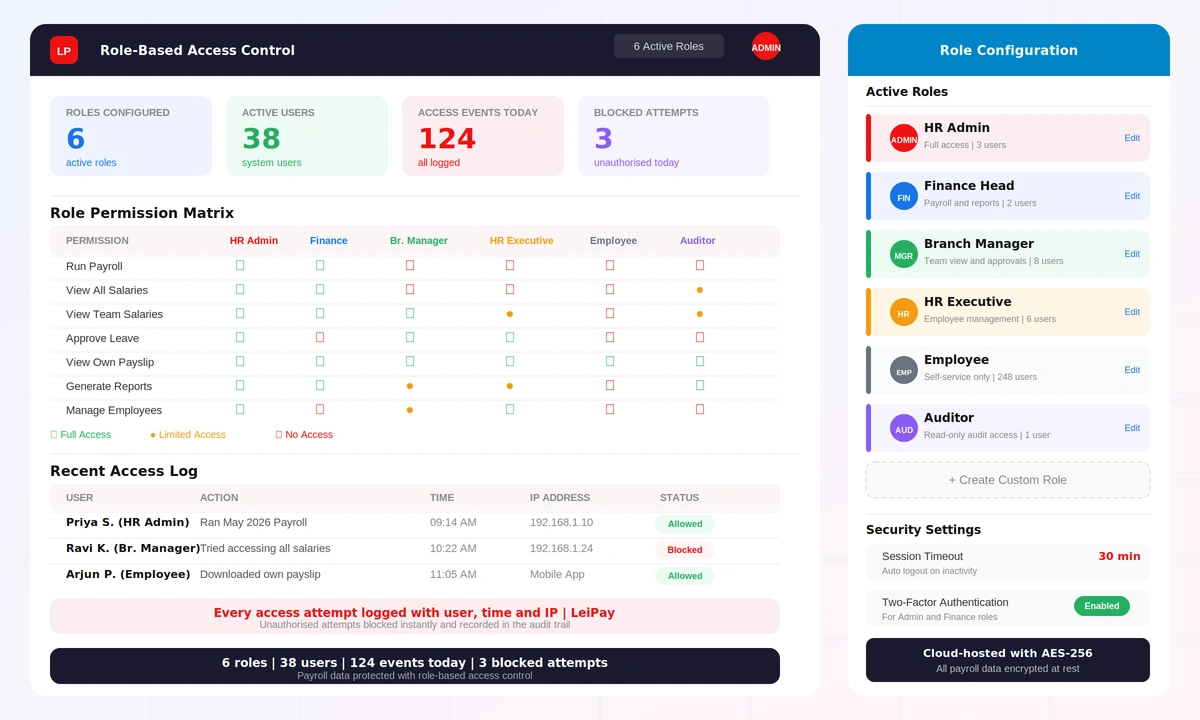
LeiPay's role-based access control for payroll ensures every user sees only what their role permits. HR admins have full access. Finance heads see payroll and reports. Branch managers see only their team. Employees see only their own data. Every permission is configurable, every access is logged, and every unauthorised attempt is blocked instantly.
Define roles — HR Admin, Finance Head, Branch Manager, HR Executive, Employee, Auditor — and assign specific permissions to each. Permissions are granular — a role can have full access to one module and read-only access to another. Custom roles can be created for any organisational structure, with permission sets tailored to your requirements.
Control what data each user can see — not just which modules they can access, but which records. Branch managers see only their branch employees. HR executives see only their assigned departments. Employees see only their own payslips and leave data. Salary information for other employees is never visible unless explicitly permitted.
LeiPay enforces security at every layer — AES-256 encryption for data at rest, TLS for data in transit, configurable session timeouts, optional two-factor authentication for privileged roles, and IP-based access restrictions. Every login, action, and access attempt is logged in a tamper-proof audit trail.
See how LeiPay's access control protects payroll data with role-based permissions and a complete access audit trail.
The system administrator defines roles in LeiPay — each with a specific permission set. Permissions can be set to full access, limited access (own team or department only), or no access for each payroll module. Custom roles can be created for unusual organisational structures.
Each LeiPay user is assigned a role during account creation — or when their responsibilities change. Role assignment takes effect immediately. A user promoted to Branch Manager immediately gains team visibility; a departing HR executive loses access the moment their account is deactivated.
Every time a user requests data — a report, a payslip, an employee record — LeiPay checks their role permissions before serving the response. Requests outside the permitted scope are blocked instantly. There is no way to access data that the role does not permit.
All user activity — successful logins, data viewed, reports downloaded, payroll processed, and blocked attempts — is written to the audit log with user name, timestamp, action, and IP address. The log is read-only and cannot be altered by any user including administrators.
LeiPay flags unusual access patterns — multiple failed login attempts, access from unusual IP addresses, or attempts to access restricted modules. The system administrator receives instant alerts and can suspend the account or investigate from the access log.
When an employee is promoted, transfers departments, or exits — their role and access permissions are updated in LeiPay immediately. No waiting period, no manual system update. Access to sensitive data is always aligned with the current organisational role.
No employee can see another employee's salary. No manager can access data outside their branch. Sensitive compensation information is visible only to roles that specifically require it — by design, not by accident.
Branch managers see only their branch employees — not other branches, not headquarters. Multi-location organisations maintain complete data separation while still giving HQ a consolidated view.
Every data access is logged permanently. For statutory compliance, internal audits, or data breach investigations — the access history for any time period is available instantly and in complete detail.
When someone leaves or changes role — access is revoked or updated immediately. There is no gap period where a departing employee still has access to salary data or where a new manager cannot yet see their team.
AES-256 encryption at rest, TLS 1.3 in transit, optional two-factor authentication, configurable session timeouts, and IP restrictions. LeiPay's security architecture meets enterprise data protection requirements.
Default roles — configurable and expandable to any structure
Unauthorised data accesses — every attempt blocked and logged
Audit coverage — every access and action logged permanently
AES-256 bit encryption for all payroll data stored at rest
See LeiPay's access control in action — role permissions, data visibility, and security audit trail, all in a live demo.